WrenchEngine

FICTIONAL EXAMPLE / PIONEER FREIGHT

Request → prepare → repair →
invoice → maintain → manage

One customer relationship connects a mobile repair for unit 214 with a separate scheduled shop visit for unit 308. Optional copilots and Cockpit are identified where they assist.

Request a personalized demo

THE CUSTOMER VIEW

Keep the fleet informed
from first request to payment.

  1. REQUESTReduced power · Unit 214

    Pioneer Freight reports a check-engine light and requests mobile service.

  2. APPROVALEstimate reviewed

    The fleet receives the estimate and approves the repair.

  3. UPDATERepair status shared

    Dispatch communicates progress and the expected return to service.

  4. INVOICE$1,118.00 delivered

    The approved invoice is delivered with available payment options. Delivery does not itself charge a payment method.

  5. NEXT VISITUnit 308 · Shop PM

    A separate preventive-maintenance visit is scheduled in the shop.

THE CONNECTED RECORD

  1. 01Request

    Core platform

  2. 02Prepare

    Core platform

  3. 03Repair

    Core + optional TC

  4. 04Invoice

    Core + optional TC

  5. 05Maintain

    Core platform

  6. 06Manage

    Core + optional Cockpit

FOUR PERSPECTIVES

The same customer.
Clear responsibility at every step.

This narrative is an example using the WrenchEngine platform with optional Dispatcher Copilot, Technician Copilot, and Cockpit.

Technician

Repair the truck. Leave a record billing can use.

A mobile EGR repair for Pioneer Freight’s unit 214, from assignment to a reviewed invoice draft.

  1. Start with the assignment

    To avoid an incomplete handoff, the technician reads the complaint, yard access instructions, and requested 4 PM return to service before travelling.

    Core workflow Dispatch prepares the assignment; the technician confirms the details.

    Next: arrive at the yard and diagnose the fault.

  2. Confirm the repair before replacing parts

    Reduced power is the symptom, not the diagnosis. The technician confirms the EGR fault, records the proposed work, and waits for the customer’s repair approval.

    Staff decision The technician diagnoses; dispatch coordinates the estimate and approval.

    Next: parts staff confirm the valve and gasket kit.

  3. Complete and document the approved work

    The technician installs one EGR valve assembly and one EGR gasket kit, then records findings, the correction, and time against unit 214.

    Optional TC Time-overrun warnings flag work that exceeds its expected time; the technician decides whether to update dispatch.

    Next: pass the recorded work to closeout review.

  4. Prepare the invoice from the work recorded

    The closeout records 3 labor hours and 0.5 travel hours. TC drafts $1,118.00 from that record; no invoice is sent yet.

    Optional AI TC builds the draft. AI service-order completeness review flags gaps for a person to resolve.

    Next: an authorized person checks the charges and approves before sending.
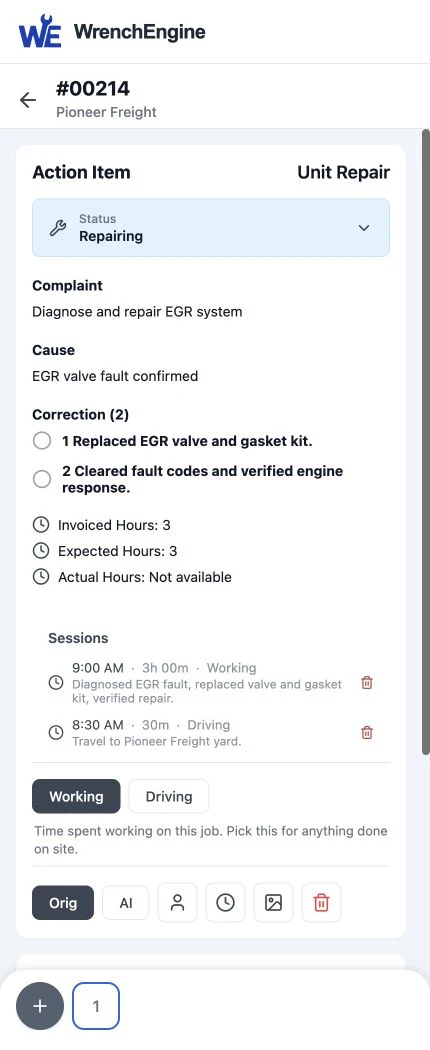
Fictional technician service order for Pioneer Freight unit 214
Pinned product component · Fictional in-progress record, before closeout

Dispatcher

Own the customer commitment at each handoff.

Capture the request, coordinate the mobile response, and keep Pioneer Freight informed without losing the job context.

  1. Capture what the customer needs

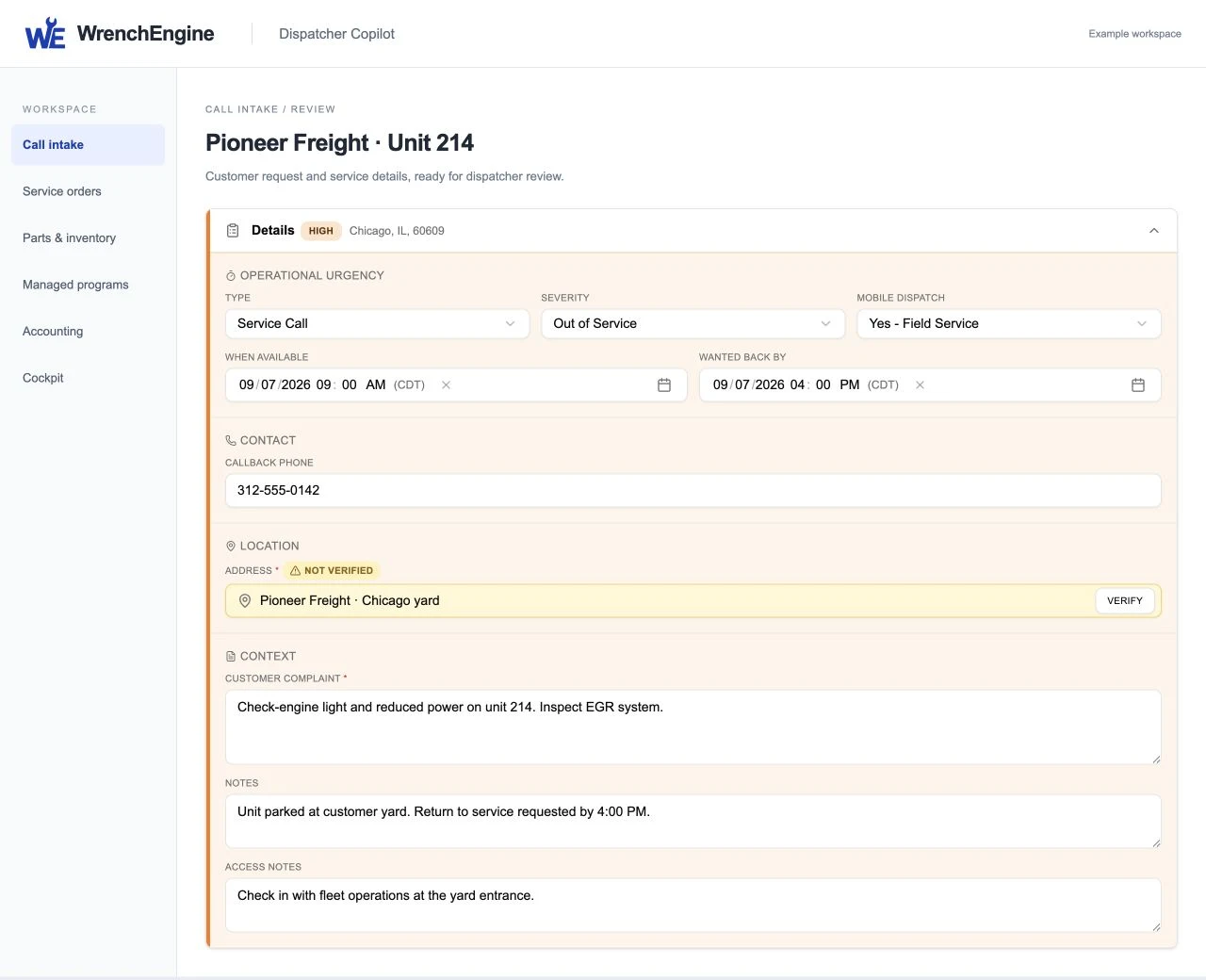
    Pioneer Freight reports reduced power on unit 214 at its Chicago yard. The dispatcher confirms access, availability, and the requested 4 PM return to service.

    Optional Dispatcher Copilot It shadows the live call and builds a draft from what the caller says. The dispatcher fills gaps and reviews before approval.

    Next: confirm the service-order draft and assign the mobile response.

  2. Make a workable assignment

    Before committing a technician, dispatch checks availability and the service location, then shares the complaint, access instructions, and customer timing.

    Core workflow A person coordinates the schedule and assignment.

    Next: the technician travels to the yard with the work order.

  3. Coordinate approval and status

    Once the technician confirms the fault, dispatch shares the estimate and obtains repair approval. If timing changes, dispatch updates the customer rather than treating the requested deadline as a guarantee.

    Staff decision Customer approval authorizes the repair; it is distinct from approval to send an invoice.

    Next: the technician completes the approved work.

  4. Close the communication loop

    After an authorized reviewer approves the $1,118.00 invoice, the team can send it. Delivery does not collect payment automatically.

    Core workflow Dispatch confirms the service update and separately coordinates unit 308’s shop appointment.

    Next: billing follows payment; the shop visit gets its own work order.

Fictional Call intake for Pioneer Freight unit 214
Pinned Call intake component · Fictional data; not a live AI demonstration

Regional Service Manager

Keep commitments visible. Put a person on the exception.

Follow the same repair through authorized operating views without confusing a reviewed record with a paid invoice.

  1. Check the customer commitment

    The manager reviews unit 214’s requested return to service. A customer target needs an owner, so the manager confirms that dispatch owns updates.

    Optional Cockpit Role-specific priorities surface follow-up within the manager’s authorized scope.

    Next: dispatch and the technician own the response.

  2. Follow up if work runs long

    If the repair threatens the service window, the manager checks the recorded status with the responsible team and helps resolve the constraint.

    Human follow-through A warning is a reason to investigate, not an automatic reassignment or a promise to the customer.

    Next: dispatch communicates any revised expectation.

  3. Distinguish review from revenue

    The $1,118.00 invoice is ready for review. The authorized reviewer checks the work and charges before approval; sent and paid remain separate states.

    Optional AI completeness review Gaps in the service order are flagged for a person to resolve, not treated as automatic invoice approval.

    Next: billing sends only after approval and tracks payment separately.

  4. Prepare the next commitment

    The manager checks upcoming maintenance and unit 308’s separate shop visit with the local team. Another asset’s appointment does not close unit 214’s repair.

    Core + optional Cockpit Maintenance uses calendar, mileage, and engine-hour triggers; consolidated views respect assigned access.

    Next: the shop and parts teams prepare unit 308’s own visit.

AUTHORIZED OPERATING VIEW

Priorities needing follow-throughIllustrative workspace
  1. Customer commitmentPioneer unit 214 · invoice ready for reviewOwner · Chicago service manager
  2. Parts follow-upAny core obligation · confirm before assigningOwner · Parts coordinator
  3. Next serviceUnit 308 · shop PM scheduledOwner · Chicago shop

Optional upgrade · No performance result is implied

Explore the regional Cockpit ${arrow}

Parts Coordinator

Put the right material on the job—and keep the record straight.

Support the unit 214 repair with staff-led stock checks and purchasing, then prepare the separate shop visit.

  1. Confirm the required material

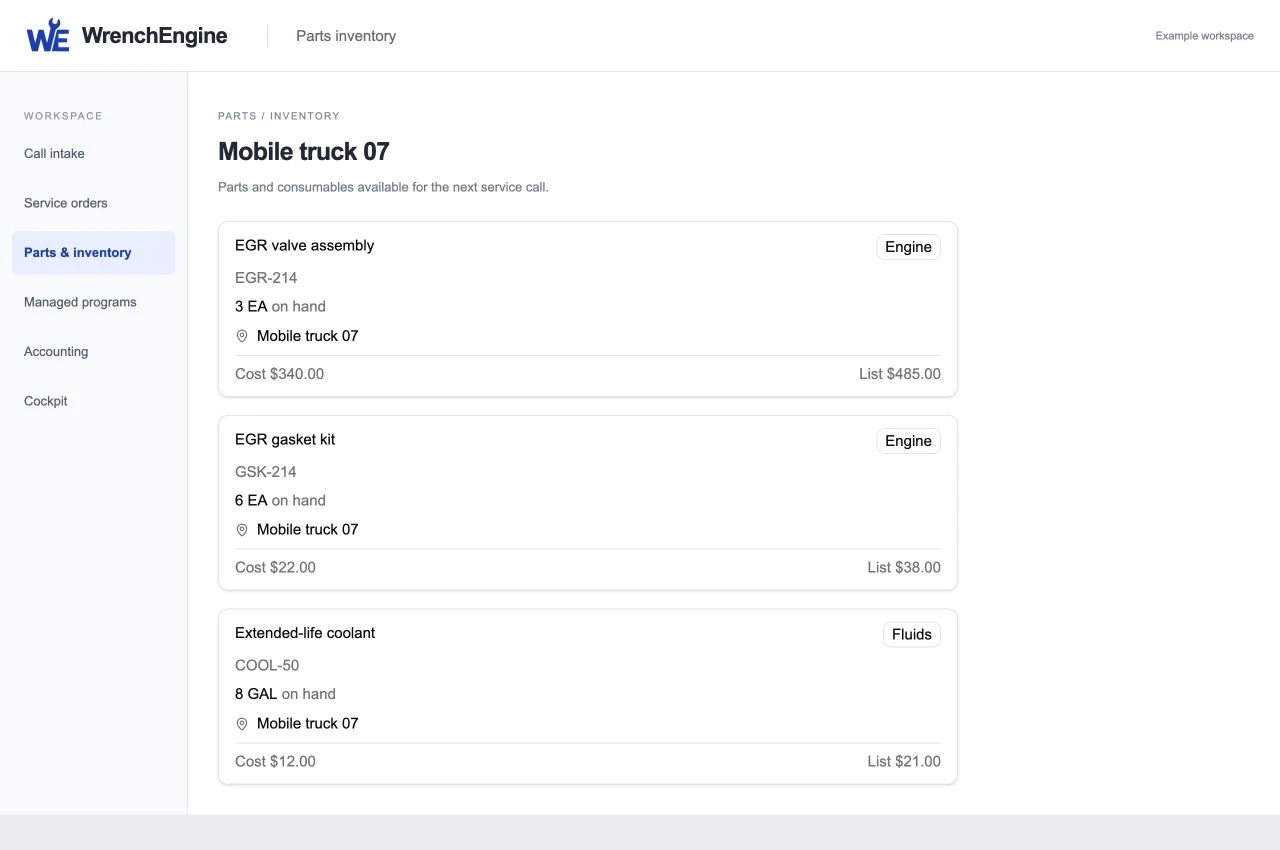
    With the diagnosis and approved work defined, parts staff confirm one EGR valve assembly and one EGR gasket kit against the technician’s request.

    Core workflow Staff check truck and location stock; this is not an AI stock check.

    Next: make the confirmed parts available to the technician.

  2. Resolve supply questions personally

    If a needed part is unavailable, the coordinator contacts the supplier, confirms price and availability, and places any required order manually.

    Staff-driven purchasing Vendor orders stay linked to the work. No copilot supplier call or autonomous ordering is implied.

    Next: tell dispatch and the technician when material will be ready.

  3. Reconcile what was actually used

    The coordinator confirms the recorded valve and gasket quantities. Any return or core obligation is checked and assigned if applicable, not assumed for this example.

    Core workflow People reconcile parts usage and follow up on returns and credits.

    Next: billing reviews the recorded material charges.

  4. Stage the next asset’s visit

    Unit 308 has its own scheduled PM visit. Parts staff check that service’s requirements and stage its material separately from the mobile EGR repair.

    Staff-driven preparation Scheduling and stock preparation remain normal team workflows.

    Next: the shop technician receives unit 308’s own work order and material.

Fictional inventory available to support the Pioneer Freight repair
Pinned inventory component · Fictional stock levels, not quantities consumed

After-hours variation: optional AI Dispatcher handles call intake outside staffed hours. A person reviews the request and coordinates the response.

Times are illustrative local times, not billable durations. Product captures show earlier record stages. Customer, units, repair, quantities, amounts, and records are fictional. No customer result or endorsement is implied.

A SEPARATE VISIT / SAME RELATIONSHIP

Unit 308 comes into the shop.

The scheduled preventive-maintenance visit uses the same fleet relationship and asset history—not the mobile repair’s invoice or timeline.

Unit 308 / Shop appointmentSeparate visit · Illustrative record
  1. Confirm the appointment

    The dispatcher agrees a service window with Pioneer Freight and assigns the shop visit.

  2. Stage the PM material

    The parts coordinator checks the requirements and stages material for unit 308.

  3. Carry out the scheduled service

    The technician records the inspection and work against unit 308’s own service order.

Staff-driven coordinationSeparate work order and invoice

SEE YOUR OPERATION IN WRENCHENGINE

Make the next handoff easier.

We’ll shape the demonstration around your service model, teams, customers, and priorities.

Request a personalized demo

Example Cockpit screen

Example Cockpit screens · Fictional data. Scroll to inspect the full screen.